Private shows while multistreaming: what about your other rooms?
You're live on three sites and a private show starts on one of them. What are the other two rooms showing right now? If the answer is "the private," you have a problem — one that's part platform rules, part economics, and entirely avoidable.
Don't leak your private shows
When you multistream, your video goes everywhere at once. If someone takes you private on one site, viewers on every other site can see the show for free.
Your paying customer is paying for something other rooms are watching for free, and on Stripchat that breaks the rules. So when a private starts, hide your video from your other rooms.
The rules by platform
Here is what the platforms demand when a private show begins on their platform.
| Platform | Official Policy on Private Shows | The Safe Action |
|---|---|---|
| Stripchat | Official guidance says do not broadcast a private or exclusive show on another platform for free at the same time. | Stop, blur, or switch other rooms to Away. |
| Chaturbate | Terms allow simultaneous streaming elsewhere; no published rule requires stopping other sites when a CB private begins. | Its terms let you stream on other sites at the same time; we found no published rule on privates. |
| MyFreeCams | Officially allows working on multiple sites. | Same as any site: Solo moves it to your chosen fallback. |
| CamSoda, Cam4, BongaCams | No specific published rule found regarding simultaneous privates. | Default to the safe rule: stop or hide the feed on these sites. |
Stripchat's community guidelines count a private or exclusive private shown publicly for free on another platform as a violation. Keep the other rooms private or paywalled, or switch them to Away or Off.
Chaturbate's terms let you stream on other sites at the same time. Showing a private for free elsewhere is still a bad idea in our view: you'd be giving away what your private buyer is paying for.
MyFreeCams officially allows working on multiple sites.
Away or Off for your other sites
When a private show starts, the site with the private stays Live. Your other sites go to one of two modes:
- Away: Shows whatever your Away is set to in your dashboard: your away clip on a loop, a blur of your camera with audio muted, or a frozen picture. The room stays up without showing the private.
- Off: Sends that site nothing, so the room goes offline there.
Use the Solo button to switch all sites instantly
Trying to manually click 'Away' on three different websites while a paying customer waits is stressful and slow. The Solo button next to each site in your dashboard keeps that room live, and automatically switches every other site to your chosen fallback instantly.
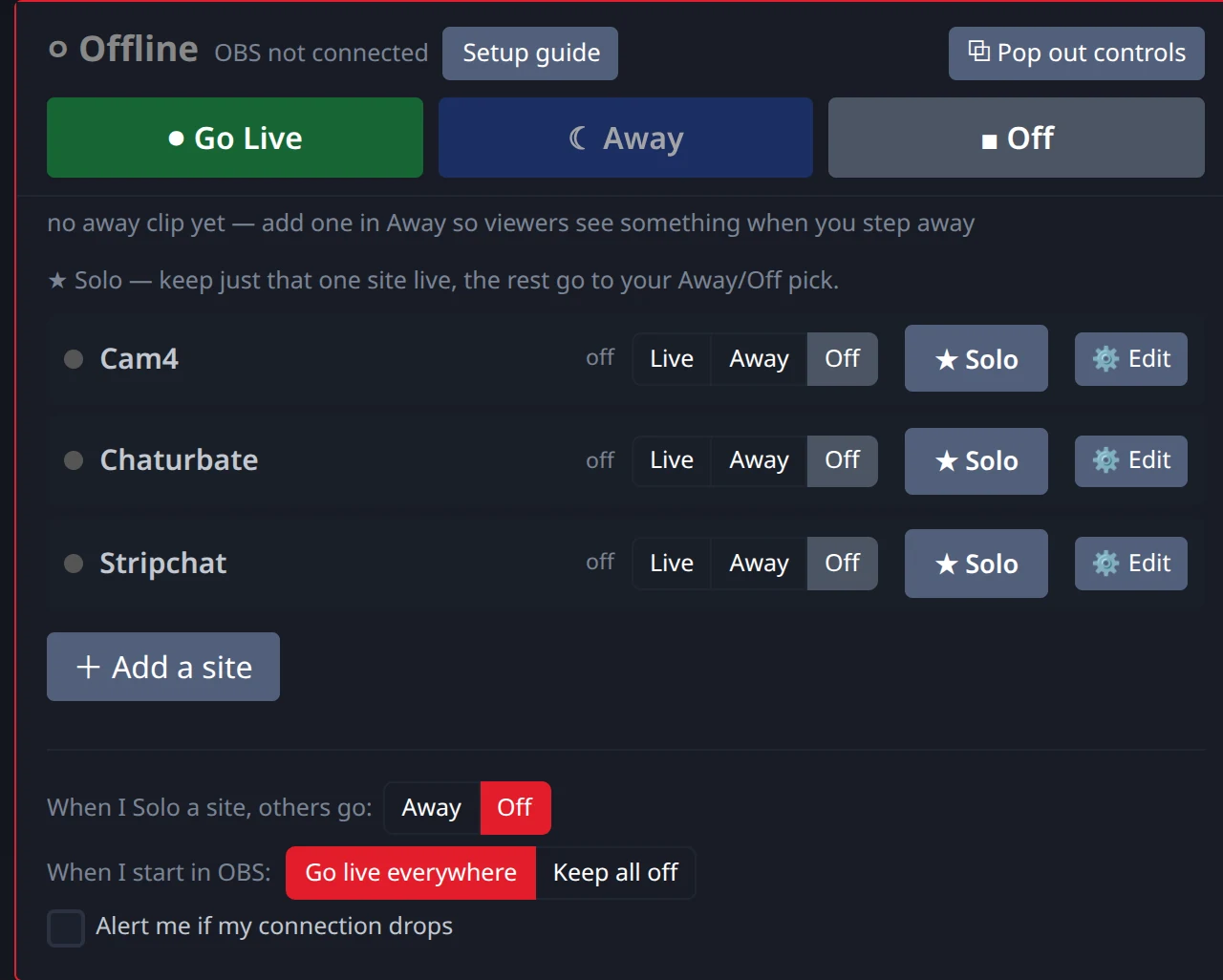
You can use Solo to focus on big tippers
If someone is tipping heavily on Chaturbate, you don't have to ignore them to keep your other rooms happy. By clicking the 'Solo' button on the Chaturbate row in your dashboard, that site stays live while your other sites switch to your Solo fallback, Away or Off. You can give the big spender your full attention, and with Away the other rooms show your away clip instead of an empty chair. When the tipping slows down, just click 'Go Live' to bring all your sites back and resume your regular public show.
Away or Off: which fallback to pick
| Fallback | What the other rooms show | Connection to the site | Best when |
|---|---|---|---|
| Away | Your away clip on a loop, or a blur or frozen picture of your camera, depending on your Away setting. | Stays up — the site keeps receiving one continuous broadcast. | The private is short and you want the room to still look tended. |
| Off | Nothing — the room goes offline on that site. | Dropped, and re-established when you set that site back to Live. | The site's own rules require you to actually stop, or the private is a long one. |
Whichever you pick is saved as your account default under “When I Solo a site, others go:”, so the choice is made once and not in the moment.
FAQ
- Do I have to stop my other streams when a private show starts?
- It depends on the site the private is on. Stripchat's guidance says don't broadcast a private or exclusive show on another platform for free at the same time — so stop or paywall the other rooms. Chaturbate's terms allow simultaneous streaming elsewhere. When a platform publishes nothing specific, the safe default is that no other room should be showing the private content.
- Can viewers on other sites see my private show?
- Yes — that's exactly the problem. Your broadcast is one feed: unless you switch the other sites to an away clip, blur, or off, everything the private buyer is paying for is also playing publicly in every other room.
- Does Solo only work for private shows?
- No — Solo is general-purpose: it keeps whichever room you pick live and switches every other room to your chosen Away or Off in one action. Go Live puts every room back afterwards.