One OBS broadcast.
Every cam site at once.
Stream-Split splits your single OBS stream and pushes it — untouched — to as many cam platforms as you want, live at the same time. No software to install. Nothing extra running on your PC.
How it works
Point OBS at us once. We do the rest in the cloud — so your computer only ever uploads a single stream.
Stream once from OBS
Add our server and your stream key in OBS and hit Start Streaming — exactly like going live on a single site.
Add your sites
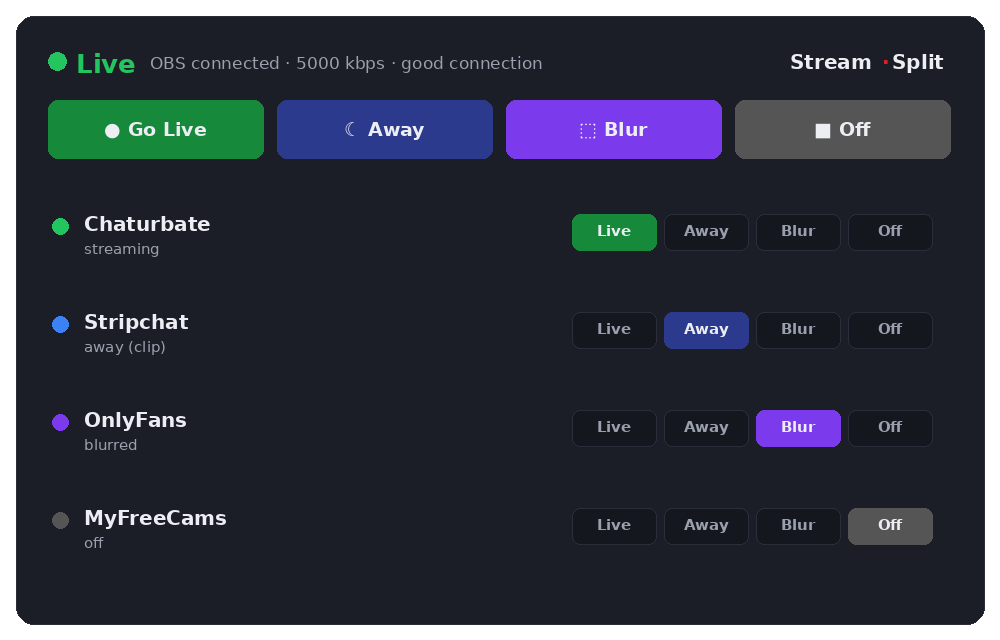
Paste each platform's stream key into your dashboard. Toggle each one Live, Away, or Off in a click.
We fan it out
Our cloud pushes your broadcast to every site at once — at full quality, with zero extra upload from you.
Multistream to the platforms you already use
Go live everywhere at once, or keep one site live and send the rest to your away clip. Your PC encodes one stream, however many sites you add: Chaturbate, Stripchat, MyFreeCams, OnlyFans and the rest all take the same OBS stream. Taken private on one site? ★ Solo keeps that site live and moves the others to Away or Off.
New to this? Read cam splitting: how to stream to different cam sites at once.
Built for working cam models
Frees up your computer
Multistreaming locally means re-encoding and uploading a separate stream for every site — it hammers your CPU and your upload. With Stream-Split your PC encodes and uploads once, no matter how many platforms you hit. Lower CPU, less heat, more headroom for your show.
Full quality, untouched
We pass your stream through exactly as OBS sends it — same resolution, same bitrate, every site.
Per-site control & Solo
Set each platform Live, Away, or Off independently — or Solo one site and send the rest to away instantly.
Away clips for privacy
Keep one site live while the others quietly play a clip you choose — so you can work a private show on one platform without going dark on the rest. Switch any site to your clip with one tap.
Stream from anywhere
We connect you to a server near you, so your stream makes a short first hop before we send it on to every site.
Privacy first
We only need an email. Your stream isn't recorded, and you stay in full control of where it goes.
Free to start
Try it without signing up, then create a free account when you want to keep your setup: your stream keys and settings are saved for next time. The account is free and stays free, with everything included, from away clips to the Solo button.
Create your free accountFAQ
- Can I really stream to multiple cam sites at the same time?
- Yes — that's the whole point. One OBS broadcast goes live on every platform you've added, simultaneously, with no extra upload from your computer.
- What is “cam splitting”?
- Cam splitting is just another name for multistreaming — sending one camera feed to several cam sites at once. Models also shorten the big sites’ names: CB (Chaturbate), MFC (MyFreeCams), SC (Stripchat). Stream-Split does the splitting in the cloud, so your PC still uploads a single stream.
- Do I need to install anything?
- No. You stream from OBS to our cloud and we fan it out. Nothing to download, nothing extra running locally.
- Will multistreaming hurt my quality or my PC?
- No. Your machine only ever uploads a single stream, and we forward it untouched, so every site gets full quality.
- What does it cost?
- It's free, with every feature included. You can try it without signing up first.
- Which sites are supported?
- Chaturbate (CB), MyFreeCams (MFC), Stripchat (SC), OnlyFans, BongaCams, Cam4, CamSoda, XLoveCam, Flirt4Free, Fansly, Cherry.tv — plus any custom RTMP destination.
Go live everywhere in minutes
One stream, every site. Point OBS at our server once, add your sites in the dashboard, and click Start Streaming. Encoding once instead of once per site is what makes working several rooms practical on an ordinary connection. Where each site keeps its stream key: Chaturbate, Stripchat, MyFreeCams, CamSoda, BongaCams, Cam4, OnlyFans.
Start free