Chaturbate OBS Setup: Stream Key & Settings
Everything you need to get OBS live on Chaturbate (CB) — stream key, server, and Chaturbate's own recommended settings. Once you're set up, stream to every other cam site too, for free, with one extra step.
Start streaming to Chaturbate — freeJust tell me what to set
Set your OBS Output Mode to Advanced, then type in these numbers. They are the settings Chaturbate publishes, so you are not guessing.
- Output Resolution: 1920x1080
- FPS: 30
- Rate Control: CBR
- Video Bitrate: 5000-8000 kbps
- Keyframe Interval: 2 seconds
- Audio Bitrate: 128 kbps
Streaming to other sites at the same time? Match the strictest one — the table below shows how Chaturbate compares.
Get your Chaturbate stream key
You need this whether you stream to Chaturbate alone or add other sites — it doesn't change either way.
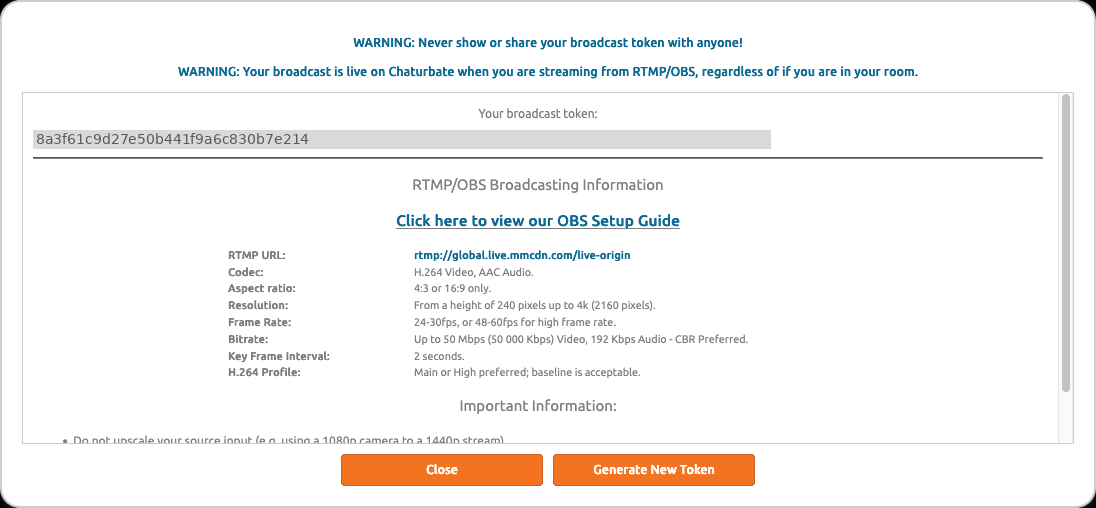
- Go to your Broadcast Yourself page (chaturbate.com/b/).
- Click "Use External Encoder to Broadcast", then "View RTMP/OBS broadcast information and stream key".
- Click "Generate New Token" if you don't have one yet, then copy your broadcast token.
Set up OBS for Chaturbate
Three panels inside OBS's Settings window. The numbers go in the table below — this is which boxes they go in.
- Settings → Stream. Open the Service dropdown and click Show all services, then choose Chaturbate. Leave Server on "Default Global Auto Select — Recommended". Paste your broadcast token into Stream Key.
- Settings → Output. Change Output Mode to Advanced before anything else — in Simple mode the keyframe interval box does not exist. Then set your encoder, bitrate, keyframe interval and rate control from the table below.
- Settings → Video. Set Base (Canvas) Resolution and Output (Scaled) Resolution to the same value — 1280x720 is the safe place to start — and Common FPS Values to 30.
Two things that catch people out. Don't pick a resolution higher than your camera actually produces: OBS will upscale it and the picture gets softer, not sharper. And check your upload speed before you go above 720p — Chaturbate runs its own test at chaturbate.speedtestcustom.com. The number you want is the upload figure, not the much bigger download one people usually quote. Leave yourself room: if your upload is under about 6 Mbps, stay at 720p.
Chaturbate settings by resolution
The encoder settings Chaturbate documents for each resolution. Stay within these and Stream-Split sends your feed to Chaturbate unchanged.
| Resolution | FPS | Video bitrate (kbps) | Audio (kbps) |
|---|---|---|---|
| 853×480 | 30 | 800–1,200 | 96 |
| 1024×576 | 30 | 1,200–3,000 | 96 |
| 1280×720 | 30 | 3,000–5,000 | 96 |
| 1920×1080 | 30 | 5,000–8,000 | 128 |
| 2560×1440 | 30 | 8,000–12,000 | 192 |
| 3840×2160 | 30 | 12,000–20,000 | 192 |
| 1920×1080 | 60 | 7,500–12,000 | 128 |
Want to also stream to other sites at the same time?
You just did the hard part. To also go live everywhere else you work, do one thing differently:
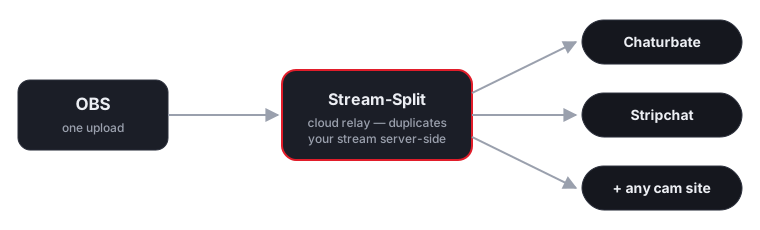
Point OBS at Stream-Split instead
Use Stream-Split's server and key in OBS (shown on your dashboard) instead of Chaturbate's directly.
Paste your Chaturbate key into the dashboard
The same key from the steps above — plus any other site's key. Switch each to Live, Away or Off with a click.
Live everywhere at once
Your broadcast reaches Chaturbate and all your other platforms simultaneously — full quality, no extra CPU.
Running Chaturbate alongside two or three other sites locally means encoding several streams at once — heavy CPU and upload at the exact moment you want headroom for an interactive token show. With Stream-Split your machine encodes once; Chaturbate gets your feed exactly as OBS sends it, whether you multistream or not.
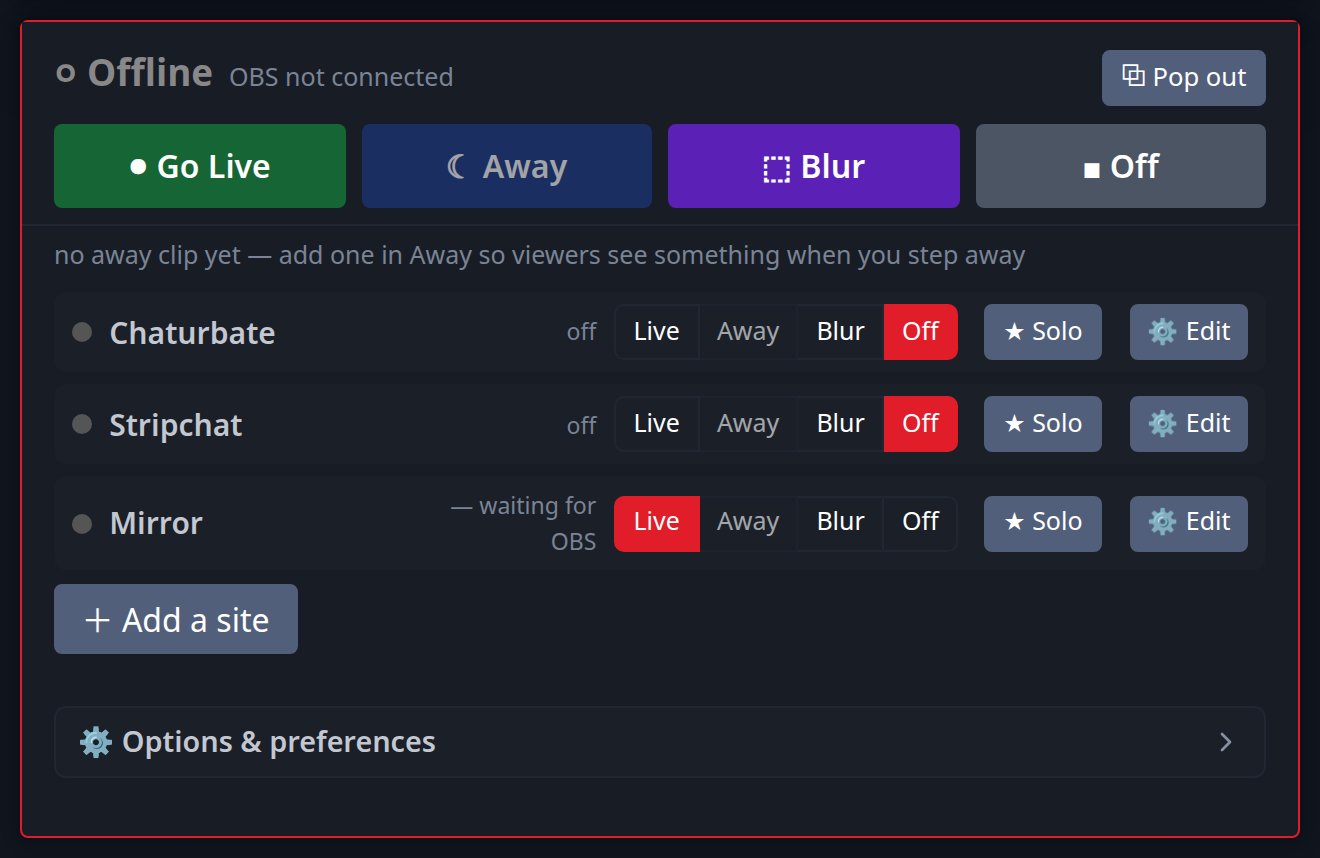
Add as many as you like alongside Chaturbate:
New to this? Read cam splitting on different cam sites or the best OBS settings.
Adding a second site to Chaturbate
Chaturbate's own limits are only half the question once you broadcast somewhere else at the same time — you send one feed, so it has to satisfy both sites. Here is what to set for each pairing, worked out from what the two sites publish.
| Chaturbate paired with | Send | Video bitrate | Keyframe / audio |
|---|---|---|---|
| + BongaCams | 1080p30 | 5,000 kbps | 2s / 128 kbps |
| + Cam4 | 1080p30 | 5,000 kbps conflict | 1s / 128 kbps |
| + CamSoda | 1080p30 | 5,000 kbps | 2s / 128 kbps |
| + MyFreeCams | 1080p30 | 5,000 kbps conflict | 1s / 128 kbps |
| + OnlyFans | 1080p30 | 5,000 kbps | 2s / 128 kbps |
| + Stripchat | 1080p30 | 5,000 kbps | 2s / 128 kbps |
Rows marked conflict are the ones worth knowing about: the two sites publish figures that do not overlap, and the higher one wins. A site rejects a feed that arrives below its stated minimum, but accepts one above its stated maximum — so matching the lower number to keep one site happy is what makes the other flag your stream.
Full working: best OBS settings for cam streaming.
Chaturbate OBS & multistreaming FAQ
- How do I stream to Chaturbate with OBS?
- Go to your Broadcast Yourself page on Chaturbate, click "Use External Encoder to Broadcast" then "View RTMP/OBS broadcast information and stream key", and copy your broadcast token. Paste it into OBS's Stream tab (Settings → Stream).
- Do I still need my Chaturbate stream key if I use Stream-Split?
- Yes — paste it into your Stream-Split dashboard instead of directly into OBS. OBS only needs to know about Stream-Split's server and key; we forward your feed on to Chaturbate, and anywhere else you add, unchanged.
- Can I stream to Chaturbate and other cam sites at the same time?
- Yes. Stream-Split takes one OBS broadcast and sends it to Chaturbate (CB) plus every other platform you add, live at the same time, with no extra load on your computer.
- Does multistreaming slow down my Chaturbate token show?
- No. The duplication to each site happens in our cloud, not on your PC, so your encode and upload load is the same as streaming to Chaturbate alone.