Home › Platforms › Chaturbate + Stripchat
Stream to Chaturbate and Stripchat at once
Be live on both Chaturbate (CB) and Stripchat (SC) from a single OBS broadcast. Stream-Split splits your feed and sends it to both at the same time — no re-encoding a separate stream for each.
Go live on both — free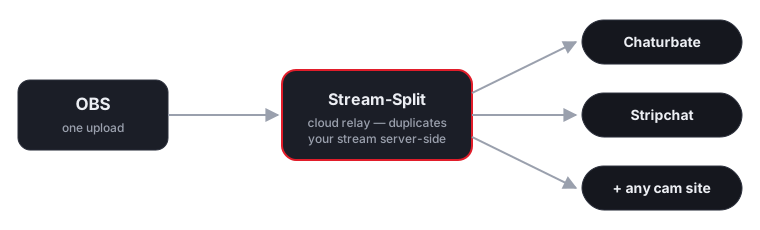
How it works
Both Chaturbate and Stripchat support high-quality interactive broadcasts, but sending a crisp 60fps feed to both locally will saturate most home internet connections. Stream-Split solves this by taking a single broadcast from your OBS software and distributing it in the cloud. You upload once, and we deliver your feed to both platforms.
Stream once from OBS
Point OBS at Stream-Split and hit Start Streaming.
Add both keys
Paste your Chaturbate and Stripchat stream keys into your dashboard.
Live on both
We deliver your broadcast to Chaturbate and Stripchat at once, at full quality.
Exact OBS settings for Chaturbate and Stripchat together
Each site publishes its own encoder limits, and they do not line up. You only get to send one broadcast, so the settings have to satisfy both at once. Here is what each site actually asks for at the highest resolution they share, and what that means for the single stream you send.
| Site | Shared resolution | Minimum bitrate | Published ceiling | Keyframe | Source |
|---|---|---|---|---|---|
| Chaturbate | 1080p | 5,000 kbps | 8,000 | 2s | Chaturbate docs |
| Stripchat | 1080p | 3,000 kbps | 6,000 | 2s | Stripchat docs |
Both sites publish a 60fps tier, so 60fps is available if your camera and upload can hold it — at 7,500 kbps rather than 5,000.
Never upscale to reach a number. If your camera tops out below 1080p, send its native resolution — both sites accept a smaller frame, and neither accepts a soft, upscaled one. Stream-Split passes your feed through untouched, so what you set in OBS is what each site receives.
FAQ
- Can I stream to Chaturbate and Stripchat at the same time?
- Yes — that's exactly what Stream-Split does. One OBS broadcast goes live on Chaturbate and Stripchat (and any other site you add) simultaneously.
- Do I have to run two streams for Chaturbate and Stripchat?
- No. Your PC uploads a single stream; we duplicate it to both Chaturbate and Stripchat in the cloud, so there's no extra CPU or bandwidth on your side.
- Is it free to stream to Chaturbate and Stripchat together?
- It's free to start, with a no-signup trial.
Prefer one site at a time?
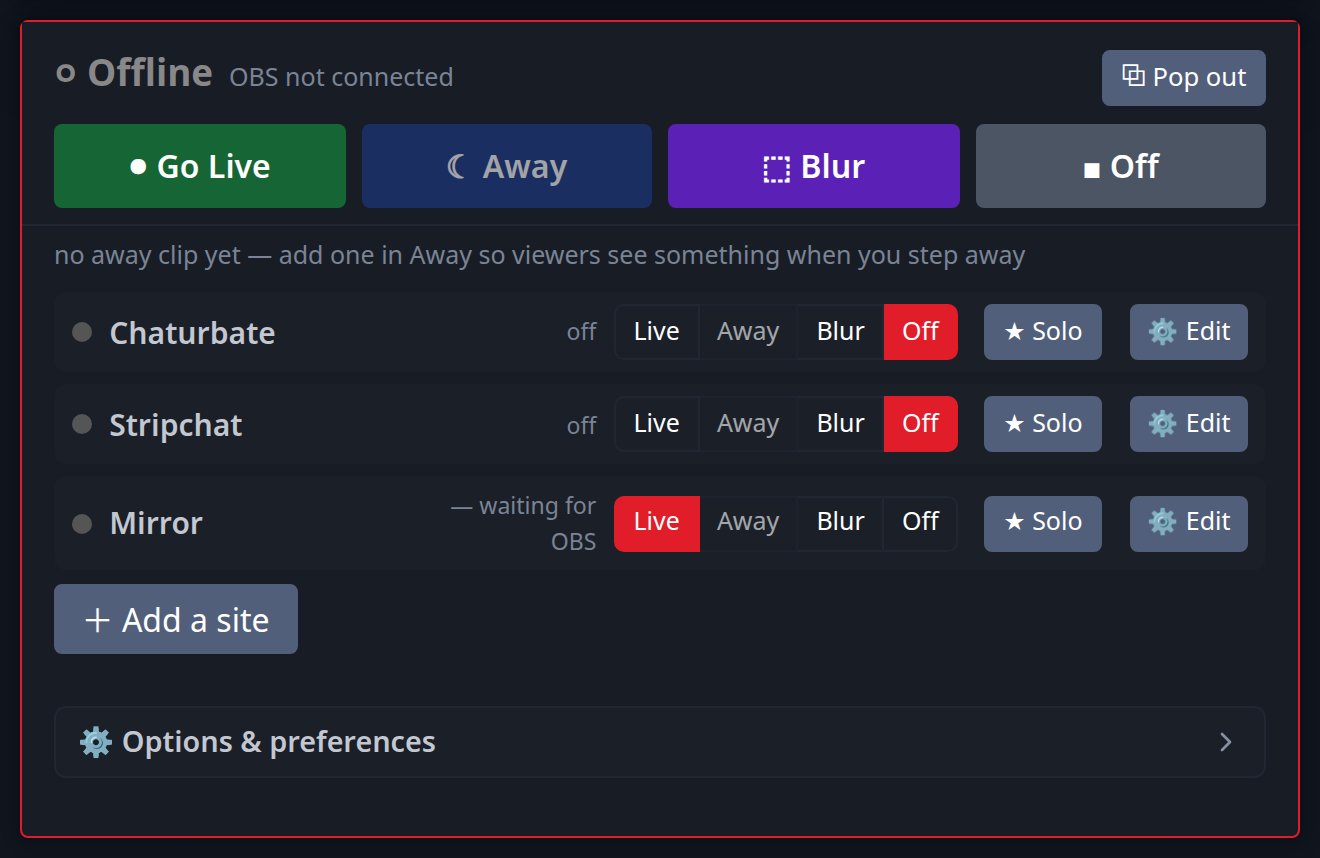
Because Chaturbate and Stripchat both feature intense, fast-paced public rooms, you may occasionally prefer to work them separately. The Stream-Split dashboard lets you manage both platforms completely independently without touching your OBS encoder. You can instantly toggle Stripchat to an 'Away' screen while you fulfil a Chaturbate token goal, then bring it back the moment you are free. See the dedicated multistreaming guide for each:
Or read cam splitting: how to stream to different cam sites at once.